...
See the new Filestack Workflows 2.0 in action with our sales engineer. Book a Walkthrough
We are aware of the recently disclosed PHP2Shell vulnerabilities (CVE-2026-109618 and CVE-2026-109619) and can confirm Filestack is not impacted by these vulnerabilities.

File Sharing App With a Short Link for Every File

A file sharing app on Filestack uploads each file straight to storage, saves its handle under a short code and previews it from the CDN.

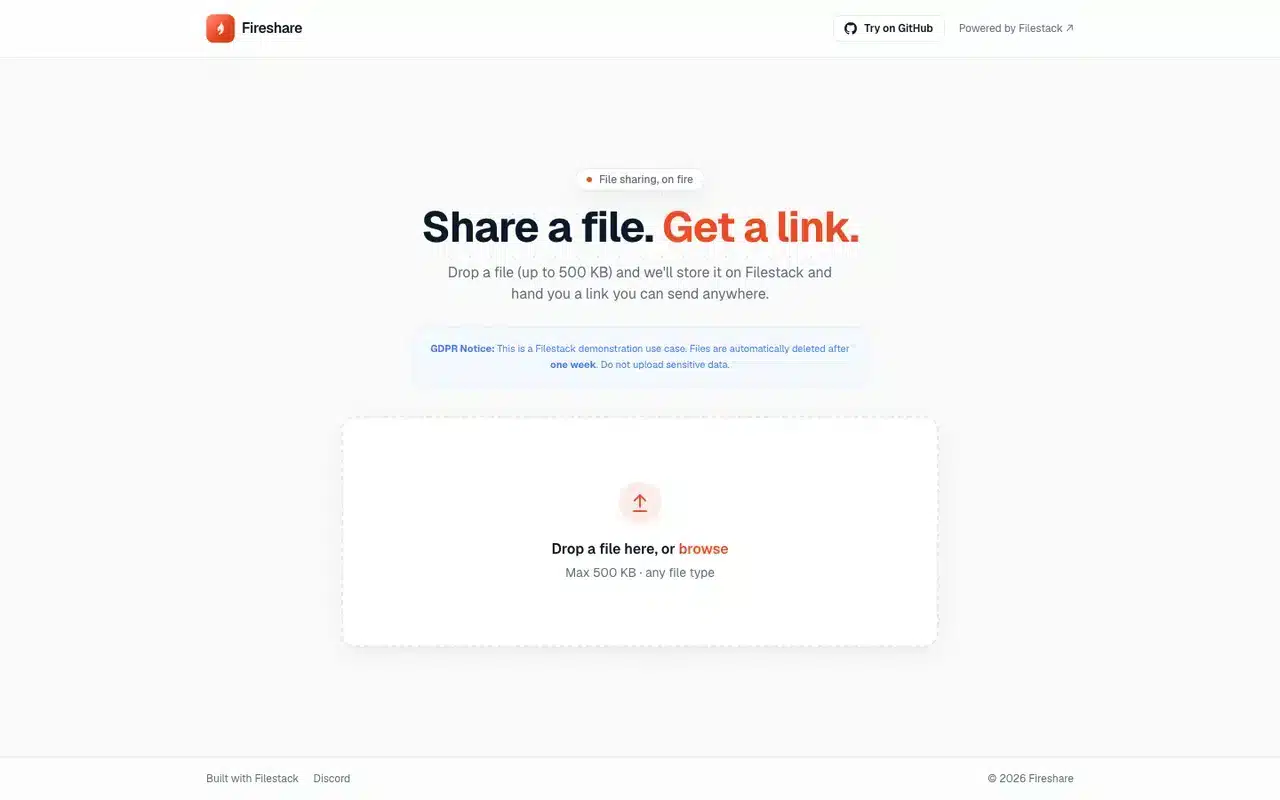
Fireshare, a fictional file sharing app on FilestackOpen
The Fireshare demo home page: Share a file. Get a link., with a drop zone for one file up to 500 KB.
One request stores the file
POST https://www.filestackapi.com/api/store/S3?key=YOUR_API_KEY&filename=notes.pdf
Content-Type: application/pdf
Use case

Fireshare is a fictional company. It was made up to show how Filestack works in file sharing, so the firm, its people and its figures are invented.

Live Filestack API

What powers it is real. Every upload, share page preview and transformation in Fireshare is a real call to the Filestack API.

View source on GitHub

What Is a File Sharing App?

A file sharing app takes a file from one person and hands back a link anyone can open. With Filestack, the browser posts the file straight to storage, your API saves the returned handle under a short code, and the share page previews the file through Filestack transformations on the CDN.

Two Ways to Send Someone a File

By attachment

  1. AttachmentA copy in the email
  2. Mail serverSets the size limit
  3. InboxesOne copy per recipient

By short link

  1. Direct uploadBrowser to Filestack storage
  2. Short codeSaved by your API
  3. Share pagePreviews from the CDN
Upload
POST /api/store/S3 with the public API key, straight from the browser
Share code
10 characters from nanoid, one row per share in a SQLite table
Validation
The API saves only cdn.filestackcontent.com URLs
Rate limit
10 shares per device in 24 hours, counted by fingerprint
Preview
Resize, rotate, monochrome and more, chained in the CDN URL
Size cap
500 KB in the demo, one constant in lib/utils.ts
Plans
Uploads, resize, rotate and monochrome on every plan. Pricing
Demo source
Fireshare, a Next.js app. View on GitHub

A Share Page Is the Handle Plus Tasks

To preview a shared file with Filestack, write transformation tasks into the CDN URL in front of the file’s handle. Every preview comes from the one stored file, so a rotated or monochrome version is a different URL, computed on request.

  1. cdn.filestackcontent.comThe Filestack CDN
  2. resize=width:300A preview 300 pixels wide
  3. rotate=deg:90Turned a quarter
  4. HANDLEThe shared file
url
The stored file's CDN address. Its last segment is the handle every preview is built on.
size
Bytes stored, shown on the share page beside the filename.
type
The MIME type. Images get transformation previews; other files get an icon and a download.
Sample store response
{
  "url": "https://cdn.filestackcontent.com/HANDLE",
  "size": 48211,
  "type": "application/pdf",
  "filename": "notes.pdf",
  "key": "STORAGE_KEY"
}

Inside Fireshare, a File Sharing App Built on Filestack

Fireshare is a demo file sharing app built on Filestack and Next.js. The product is invented and every file call is real: one file is dropped, posted to Filestack, saved under a short code and shared as a link.


  1. The drop zone takes a drag or opens the native file picker, one file at a time. The demo checks the size in the browser before any upload starts.


  2. One request sends the raw file to the store endpoint with the public API key, and the upload's progress streams back into the page.


  3. The browser sends the returned URL to the app's own API, which checks it is a Filestack CDN URL, counts the device's recent shares and saves the row under a 10-character code.


  4. The success card copies /s/CODE in one click. The share page looks up the handle and draws each preview as a chain of Filestack tasks on it.

Uploader.tsx
import { MAX_FILE_BYTES } from '@/lib/utils'; // 500 * 1024

async function handleFile(file) {
  if (file.size > MAX_FILE_BYTES) {
    return setState({ kind: 'error', message: `${file.name} is over 500 KB` });
  }
  setState({ kind: 'uploading', progress: 0, file });
  const res = await uploadToFilestack(file, apiKey, onProgress);
}
Uploader.tsx
function uploadToFilestack(file, apiKey, onProgress) {
  return new Promise((resolve, reject) => {
    const params = new URLSearchParams({ key: apiKey, filename: file.name });
    const xhr = new XMLHttpRequest();
    xhr.open('POST', `https://www.filestackapi.com/api/store/S3?${params}`);
    xhr.setRequestHeader('Content-Type', file.type || 'application/octet-stream');
    xhr.upload.onprogress = (e) => onProgress(Math.round((e.loaded / e.total) * 100));
    xhr.onload = () => (xhr.status < 300 ? resolve(JSON.parse(xhr.responseText)) : reject());
    xhr.send(file);
  });
}
app/api/share/route.ts
export async function POST(req) {
  const b = await req.json();
  if (!/^https:\/\/cdn\.filestackcontent\.com\//.test(b.url))
    return NextResponse.json({ error: 'Bad URL' }, { status: 400 });

  const since = Date.now() - 24 * 60 * 60 * 1000;
  const [{ count: n }] = await recentShares(b.fingerprint, since);
  if (n >= 10) return NextResponse.json({ error: 'Rate limit' }, { status: 429 });

  const code = nanoid(10);
  await db.insert(schema.shares).values({ id: nanoid(), code, ...b, createdAt: Date.now() });
  return NextResponse.json({ code });
}
components/Transformations.tsx
function buildUrl(handle, tasks) {
  return `https://cdn.filestackcontent.com/${tasks.join('/')}/${handle}`;
}

// A 300px preview, turned a quarter
const rotated = buildUrl(share.handle, ['resize=width:300', 'rotate=deg:90']);

What a File Sharing App Needs Behind Every Link

A file sharing app needs an upload endpoint, storage, a CDN, an image renderer for previews, a table of share codes and a rate limiter. Filestack stores, serves and renders; your app keeps the codes and the limits.

Build the File Plane

6 parts your team builds and runs
01 An upload endpoint with progress and retries
02 Object storage for every file
03 A CDN in front of the storage
04 An image service for previews
05 A share-code table and lookup route
06 A rate limiter for each device

Post the File to Filestack

1 request stores the file and returns its CDN URL
Upload
POST https://www.filestackapi.com/api/store/S3?key=YOUR_API_KEY&filename=notes.pdf

Your app keeps the share codes and the rate limit.

Tour the Fireshare App

Drop a file on the Fireshare home page, then open the link it gives you.

  1. 1

    The drop zone /

    Drop a file up to 500 KB, or browse for one.

  2. 2

    The upload /

    Progress streams from the request, and the success card shows the link with a Copy button.

  3. 3

    The share page /s/CODE

    The file by its code, with transformation previews for images.

  4. 4

    An unknown code /s/CODE

    A mistyped code opens the not-found page.

Open Fireshare in your browser and follow the route, or read the Next.js code it runs.

Fireshare home page
Fireshare's drop zone: drop a file here, or browse, up to 500 KB of any file type.
Fireshare's one control: a drop zone that posts the file to Filestack and returns a short link.

Run a File Sharing App in Production

In production, a file sharing app signs each upload with a Filestack policy made on the server, gives shared links an expiry and keeps share limits on signed-in accounts as well as devices.

  • Sign each upload

    A policy signed on your server sets what a browser upload may do and until when.

  • Expire shared links

    A signed policy with an expiry ends access at the time you set.

  • Screen every upload

    virus_detection in a Workflow checks each file before its link goes out.

  • Keep codes long enough

    10 characters from nanoid's 64-symbol alphabet leave little room for guessing.

  • Limit by account

    Count shares per signed-in user as well as per device fingerprint.

  • Raise the size cap

    Change one constant, and move to the picker for multipart, resumable uploads.

sign-upload.js
import { createHmac } from 'node:crypto';

const expiry = Math.floor(Date.now() / 1000) + 300;
const policy = Buffer.from(JSON.stringify({ call: ['store'], expiry }))
  .toString('base64').replace(/\+/g, '-').replace(/\//g, '_');
const signature = createHmac('sha256', process.env.FILESTACK_APP_SECRET)
  .update(policy).digest('hex');

const uploadUrl = `https://www.filestackapi.com/api/store/S3?key=YOUR_API_KEY`
  + `&policy=${policy}&signature=${signature}`;
Sample share row
{
  "code": "V1StGXR8_Z",
  "handle": "HANDLE",
  "size": 48211,
  "views": 0,
  "created_at": 1792512000
}

Ways to Share a File Compared

A file sharing app on Filestack keeps one stored copy and hands out a short link on your own domain. An email attachment travels as a copy to every inbox, and a file-sharing service keeps the file inside its own product.

Email attachmentFile-sharing serviceYour app on Filestack
Size limitSet by the mail serverSet by the service's planSet by your app, 500 KB in the demo
Where the file livesIn every inbox it reachesThe service's storageOne copy in Filestack storage
The linkThe attachment itselfThe service's link formatA short code on your domain
PreviewsThe mail client's viewerThe service's viewerTransformations in the CDN URL
BrandThe sender's mail clientThe service's brandYour app

A file-sharing service suits a team that wants a ready-made product under the vendor’s brand.

Short Links on Filestack Beyond File Sharing

Course portals, design studios, support desks and print shops take a file from one person and hand another a link, and each runs on the same upload, handle and CDN URL.

Design proof sharing

Send a client a link to the latest mockup, marked as a draft.

  • resize
  • watermark

Support ticket attachments

Customers attach a file; agents open it by link.

  • virus_detection

Print orders

Customers upload artwork; the shop opens a sized preview.

  • resize
  • output

Event photo drops

Guests upload photos to one gallery link.

  • resize

Contract exchange

Share a contract under a link that expires.

  • security

Course materials

Lecturers share slides and readings as one short link.

  • preview

Turn every upload into a link your users can share.

  • SOC 2 compliant
  • Most teams ship their first upload within minutes
  • Trusted by 100,000+ applications

File Sharing App FAQs

What is a file sharing app built on Filestack?

A file sharing app built on Filestack stores each file in Filestack storage and gives the sender a short link to pass on. The link opens the file, or a CDN preview of it, in the recipient’s browser.

How does Fireshare upload files to Filestack?

The browser posts the file to Filestack’s store endpoint, /api/store/S3, with the public API key. The response carries the file’s CDN URL, and the app saves its handle under a 10-character code.

What database does the demo use?

Turso, a hosted libSQL database, through Drizzle ORM. One shares table holds the code, handle, filename, size and view count, indexed on code and fingerprint. Any Drizzle adapter, such as Postgres or MySQL, can take its place.

How large can a shared file be?

The demo caps files at 500 KB with MAX_FILE_BYTES in lib/utils.ts. Raise the constant for larger files, and use the Filestack picker for multipart, resumable uploads.

How do I secure uploads and shared links?

Sign each upload with a Filestack security policy made on your server, and give shared links an expiry in a signed policy. The demo uploads with the public key and checks every saved URL against the Filestack CDN.

Does the demo limit how many files a device can share?

Yes. Each device can create 10 shares in 24 hours. The browser sends a fingerprint built from the user agent, locale, screen and time zone, and the API counts that fingerprint’s recent shares before saving a new one.

Is Fireshare a real company or a Filestack customer?

Fireshare is a fictional company, created to show how Filestack works in file sharing. The product, its people and its figures are invented, and the demo runs on the real Filestack API.

Can I see the code behind the Fireshare demo?

Yes. Fireshare is open source on GitHub in the filestack-use-cases repository, under apps/fs-filesharing. It is a Next.js app with the uploader, the share route and the share page.