

doc_detection=coords:true
→ { "coords": { "x":290, "y":91,
"width":577, "height":600 } }




How a document photo becomes a routed decision
A photograph of a printed feedback card becomes a routed escalation through an OCR pipeline with a decision at the end. Four stages and four URLs move the document from capture to routing without manual review.

A photograph, taken at an angle, on a wooden table. This is what document intake actually looks like.
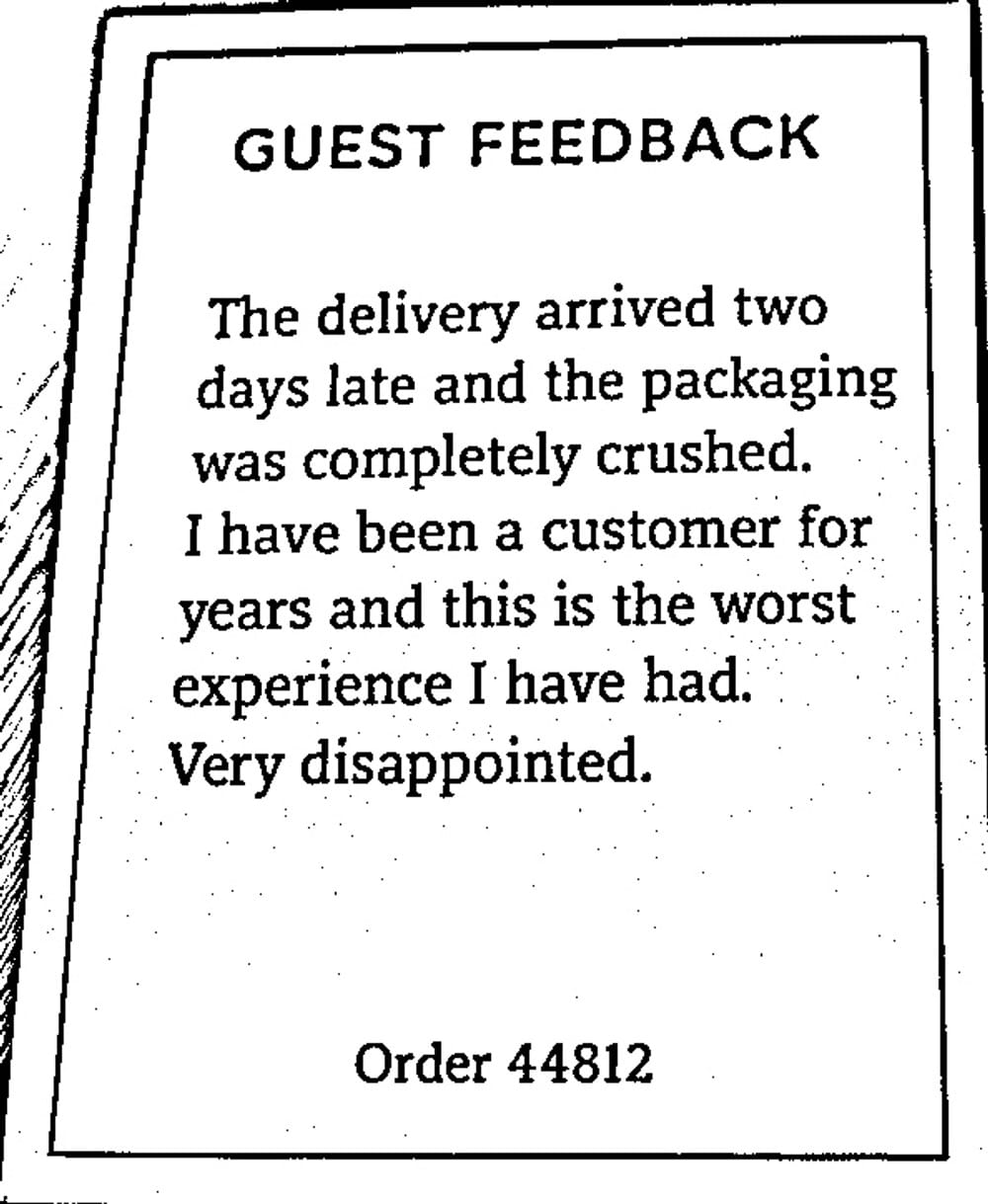
The card is found, cropped out of the table, and flattened before anything tries to read it.
Text plus a bounding box for every word, which is what makes field mapping and redaction possible downstream.
"Positive": 0.00011721921327989548,
"Negative": 0.9997523427009583,
"Neutral": 0.000059915179008385167,
"Mixed": 0.00007042545621516183 } }
Negative, so the Workflow routes it to the escalation queue instead of the archive. Nobody read it first.
Detect and deskew documents in phone photos before OCR
Users photograph documents rather than scanning them. The doc_detection task finds the page inside the photo, crops the frame away, and straightens what is left, with preprocess:true adding denoise and deskew.
Running it before OCR is what moves accuracy. OCR on a page photographed at an angle is where most home-built document flows quietly fail.
The same step handles identity document OCR, where the input is a phone photo of a passport rather than a receipt. What happens to that text next is the sensitive documents pipeline.
https://cdn.filestackcontent.com/security=.../
doc_detection=coords:true/y6FWFAcwTDipfjs6UUR0
{ "coords": { "x": 290, "y": 91,
"width": 577, "height": 600 } }
# or get the flattened scan back directly
doc_detection=preprocess:true/
{ "text": "disappointed",
"bounding_box": [
{ "x": 350, "y": 331 },
{ "x": 766, "y": 404 } ] }
# those coordinates drive redaction too
Extract data from documents, and keep the coordinates
The ocr task returns the text of the document along with a bounding box for every word and line. The text is the obvious part. The coordinates are the part that matters, because they are what let you map a value to a field, or obscure it.
Use the text extraction API after document detection to read a flattened page and send the result directly into field mapping, redaction, or routing. See the OCR API page for the response format and limits.
Score extracted text with sentiment analysis to route documents
The text_sentiment task runs text sentiment analysis on what came back, scoring it across Positive, Negative, Neutral, and Mixed in thirteen languages.
Use the sentiment score to route documents without adding a separate sentiment analysis API, key, or request. For customer feedback, the score can determine which queue receives each submission.
The text_sentiment task accepts extracted text within a handle-based transformation URL. See the Intelligence documentation for the required URL syntax.
# handle still terminates the path
https://cdn.filestackcontent.com/security=.../
text_sentiment=text:"...",language:en/
y6FWFAcwTDipfjs6UUR0
{ "emotions": {
"Positive": 0.00011721921327989548,
"Negative": 0.9997523427009583,
"Neutral": 0.000059915179008385167,
"Mixed": 0.00007042545621516183 } }
Route every incoming document automatically with Workflows
A Workflow runs the chain on every upload, branches on the score, and reports the outcome to your endpoint with a signed webhook. That branch is the document routing step, and it is what makes this document workflow automation rather than four API calls somebody has to remember. Attach the OCR workflow to an upload path once and every document is handled on arrival.
Document intelligence use cases from invoices to resumes
Each of these is the same chain with a different branch at the end.
Invoice automation
Photographed receipts and invoices are flattened, read, and filed against the right order. Your code maps the extracted text to the fields you care about. If you are building a receipt scanning app, this is the chain underneath it.
Expense report automation
A phone photo becomes a line item without anyone typing it. Coordinates let you locate totals in a consistent layout.
Customer feedback analysis
Sentiment decides the queue. Angry goes to a human today, neutral goes to the weekly report.
Resume parsing
Documents land, get read, and get routed by role or team. A resume parsing API built this way hands back text and coordinates, and your code decides what a job title looks like.
Filestack document intelligence compared with dedicated IDP suites
The dedicated IDP suites do more of the document job. Filestack does the file job around it.
| Filestack | ABBYY | Rossum | Document AI | |
|---|---|---|---|---|
| File intake, storage, delivery | Included | No | No | No |
| Capture from a phone photo | doc_detection | Yes | Yes | Partial |
| Chained in one call | Yes | No | No | No |
| Sentiment on extracted text | text_sentiment | No | No | Separate API |
| Trained per-document field models | No | Deep | Deep | Deep |
| Human review interface | No | Yes | Yes | Yes |
| ERP and accounting connectors | No | Yes | Yes | Partial |
Choose a dedicated IDP suite when you need trained field models, review interfaces, or finance connectors. Choose Filestack when you need the file intake, extraction, and routing layer for document-processing automation you control.
Frequently asked questions about intelligent document processing
What is intelligent document processing?
Intelligent document processing covers capture, reading, and routing in software rather than by hand. A Filestack document intelligence pipeline chains doc_detection, ocr, and text_sentiment in one flow, which makes it automated document processing assembled from chainable file tasks rather than bought as a suite.
Can it read a photo of a document?
Yes. The doc_detection task finds the document inside the photograph, crops away the background, and deskews it before OCR runs, which is what makes phone photos usable as document input.
What is document detection?
Document detection locates the edges of a document within a larger image and returns either the corner coordinates or a normalized flat scan. It runs before OCR so the text is read from a straightened page rather than an angled photograph.
Can I route documents automatically based on their content?
Yes. A Workflow can branch on the result of an intelligence task, so a negative sentiment score can send a document to an escalation queue while everything else goes to the archive, with the outcome delivered to your endpoint by webhook.
Does it extract specific fields like invoice totals?
Not automatically. The ocr task returns the full text and a bounding box for every word. Your application maps those results to the fields it needs and classifies the document, because Filestack does not provide trained field models or a document-classification API for each document type.