

The image displays the text FILESTACK UPLOAD™ in large, gray capital letters on a white background.

The technology to make every upload faster & more reliable

A file upload interface shows options like My Device, URL, and social media sources. A smartphone mockup displays a grid of colorful photos, including people, animals, and nature images, ready for selection or upload.

Accelerated performance your users will notice with each and every upload

Simple illustration of a stopwatch with a gray outline and a red hand pointing to the 4 o’clock position.

LESS WAITING

Make uploads over 3x faster

22s

Normal File Upload

6s

Normal File Upload

100MB File. Based on average results from globalized testing.

A simple illustration of a smartphone with a large red check mark displayed on its screen.

FEWER FAILURES

Make uploads 100x more reliable

A dark purple circle with a white center containing a dark purple X, resembling a close or cancel button icon.

Google Drive

A dark purple circle with a white center containing a dark purple X, resembling a close or cancel button icon.

Plupload

A dark purple circle with a white center containing a dark purple X, resembling a close or cancel button icon.

jQurey Uploader

A white checkmark inside an orange circle, with a white border around the circle, symbolizing confirmation or approval.

Filestack

In testing, only Filestack could succesfully handle poor networks.

We’ve had a six year obession with upgrading the file upload experience.

Normally, 1 in 10 uploads fail.
Filestack changes that.

Driven to solve the major application painpoint of unreliable uploads, we’ve designed an intelligent, global network that bests the industry average of 85% with an impressive 99.9999% upload success rate.

HOW OUR TECHNOLOGY WORKS

The Global Network Built For Better Uploads

A simple gray outline of a smartphone with a red exclamation mark displayed on its screen, indicating a warning or alert message.

Most networks are optimzed to accelerate downloads, not uploads—leaving reliable uploads a largely unsolved problem, especially on mobile.

A gray geometric network icon featuring a large circle with four smaller connected circles inside, linked by straight lines in a pattern, on a light background.

Creating a “CDN for uploads”, Filestack has invested heavily in worldwide presence & network technology to facilitate rapid, reliable uploads.

A series of vertical bars of varying heights; all are gray except one shorter bar near the right, which is orange. The background is light gray.

Intelligent Ingestion™ automatically and continually responds to changing network conditions—dynamically adjusting packet sizes to guarantee upload success 99.999% of the time.
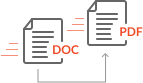
Icon showing a DOC file being converted to a PDF file. An arrow points from the DOC file to the PDF file, indicating the conversion process.

Even better, Filestack’s network can actually execute complex file transformations on the network, as files are being uploaded and still in transit.
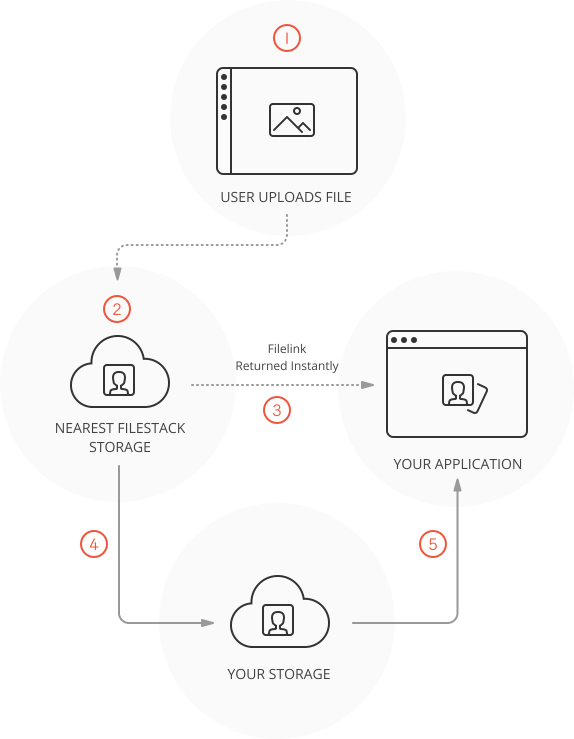
A diagram showing a 5-step file upload process: user uploads a file, it goes to Filestack storage, a file link is returned instantly to the application, and finally, the file is sent to the users storage.

How the Content Ingestion Network™ (CIN) Works

  1. The process begins when the user uploads a file from a mobile or local device.
  2. The file is sent to the nearest Filestack Storage Location which are geographically distributed.
  3. When the file reaches the nearest FIlestack Storage Location you are returned an immediately usable Filelink.
  4. The file uploads asynchronously from the Filestack Storage to your permanent cloud storage location.
  5. When the file reaches its final destination, the filelink will be updated to point to your cloud storage.When the file reaches its final destination, the filelink will be updated to point to your cloud storage.

Guarantee that all of your files are securely uploaded, every time

Authorize various API operations like protecting public URLs, guaranteeing a secure file upload every time with Filestack Upload. Deliver large multimedia files and documents to users with our powerful CDN, equipped with built-in optimization and security features. Configure all of your security settings directly within your Developer Portal.

SEE HOW OUR UPLOAD TECHNOLOGY STACKS UP

The option to pick where your files are stored

Bad Network Conditions
Testing a network with big request loss where loss is random 0-60% (common for mobile devices or faulty hardware).

Platforms 42 MB File Size 6 MB File Size 3 MB File Size
Filestack Standard A white X symbol centered inside a solid dark purple circle, commonly used as a close or cancel button icon. A white X symbol centered inside a solid dark purple circle, commonly used as a close or cancel button icon. A white check mark inside a solid red-orange circle, symbolizing confirmation or approval.
Filestack Intelligent Ingestion™ A white check mark inside a solid red-orange circle, symbolizing confirmation or approval. A white check mark inside a solid red-orange circle, symbolizing confirmation or approval. A white check mark inside a solid red-orange circle, symbolizing confirmation or approval.
Google Drive A white X symbol centered inside a solid dark purple circle, commonly used as a close or cancel button icon. A white X symbol centered inside a solid dark purple circle, commonly used as a close or cancel button icon. A white X symbol centered inside a solid dark purple circle, commonly used as a close or cancel button icon.
Plupload A white X symbol centered inside a solid dark purple circle, commonly used as a close or cancel button icon. A white X symbol centered inside a solid dark purple circle, commonly used as a close or cancel button icon. A white X symbol centered inside a solid dark purple circle, commonly used as a close or cancel button icon.
jQuery File Uploader A white X symbol centered inside a solid dark purple circle, commonly used as a close or cancel button icon. A white X symbol centered inside a solid dark purple circle, commonly used as a close or cancel button icon. A white X symbol centered inside a solid dark purple circle, commonly used as a close or cancel button icon.

Low Quality of Service
Testing a network where a low size limit has been set and files are being sent over a connection with a router that has many connections happening simultaneously. (This is common for hotels, restaurants, and coffee shops.)

Platforms 42 MB File Size 6 MB File Size 3 MB File Size
Filestack Standard A white X symbol centered inside a solid dark purple circle, commonly used as a close or cancel button icon. A white X symbol centered inside a solid dark purple circle, commonly used as a close or cancel button icon. A white X symbol centered inside a solid dark purple circle, commonly used as a close or cancel button icon.
Filestack Intelligent Ingestion™ A white check mark inside a solid red-orange circle, symbolizing confirmation or approval. A white check mark inside a solid red-orange circle, symbolizing confirmation or approval. A white check mark inside a solid red-orange circle, symbolizing confirmation or approval.
Google Drive A white X symbol centered inside a solid dark purple circle, commonly used as a close or cancel button icon. A white X symbol centered inside a solid dark purple circle, commonly used as a close or cancel button icon. A white X symbol centered inside a solid dark purple circle, commonly used as a close or cancel button icon.
Plupload A white X symbol centered inside a solid dark purple circle, commonly used as a close or cancel button icon. A white X symbol centered inside a solid dark purple circle, commonly used as a close or cancel button icon. A white X symbol centered inside a solid dark purple circle, commonly used as a close or cancel button icon.
jQuery File Uploader A white X symbol centered inside a solid dark purple circle, commonly used as a close or cancel button icon. A white X symbol centered inside a solid dark purple circle, commonly used as a close or cancel button icon. A white X symbol centered inside a solid dark purple circle, commonly used as a close or cancel button icon.