

enhance/
no_metadata/
rounded_corners=radius:max/
output=format:webp/




Center crop versus face crop for profile pictures
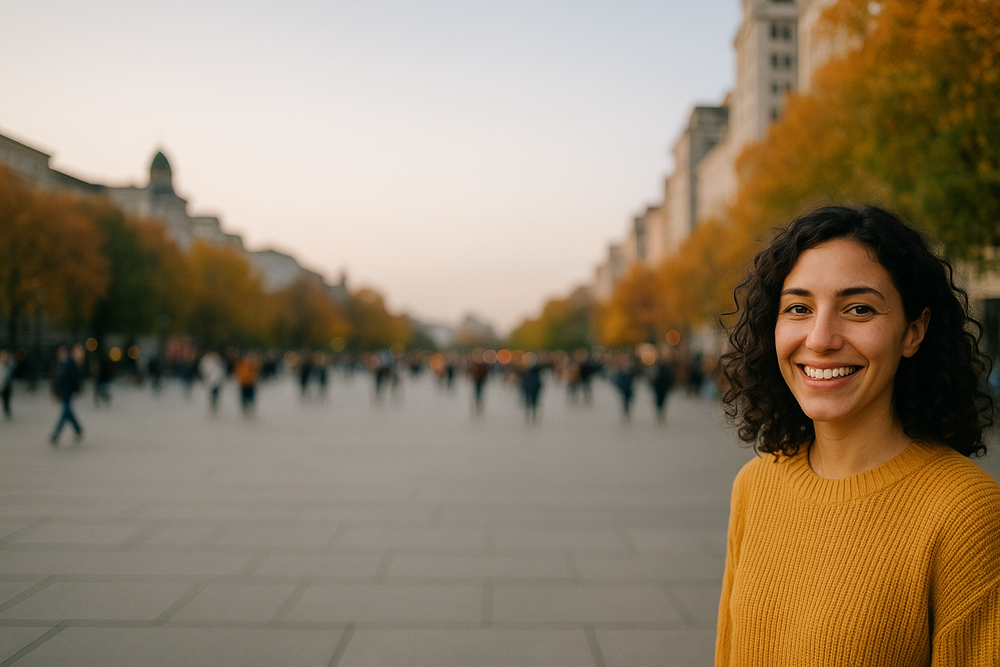
The same upload, two strategies. One of them cuts her head off and it is the one most products ship. Same story for an employee photo in a staff directory, where the source is whatever HR was emailed.
1536 x 1024. She is at the right edge and the entire middle of the frame is empty plaza. A completely normal photo for someone to pick as their avatar.

resize=fit:crop takes the middle of the frame, which here is an empty plaza. Her face is sliced down the edge. Automatic image cropping with no idea what the subject is comes out as arithmetic on the frame.

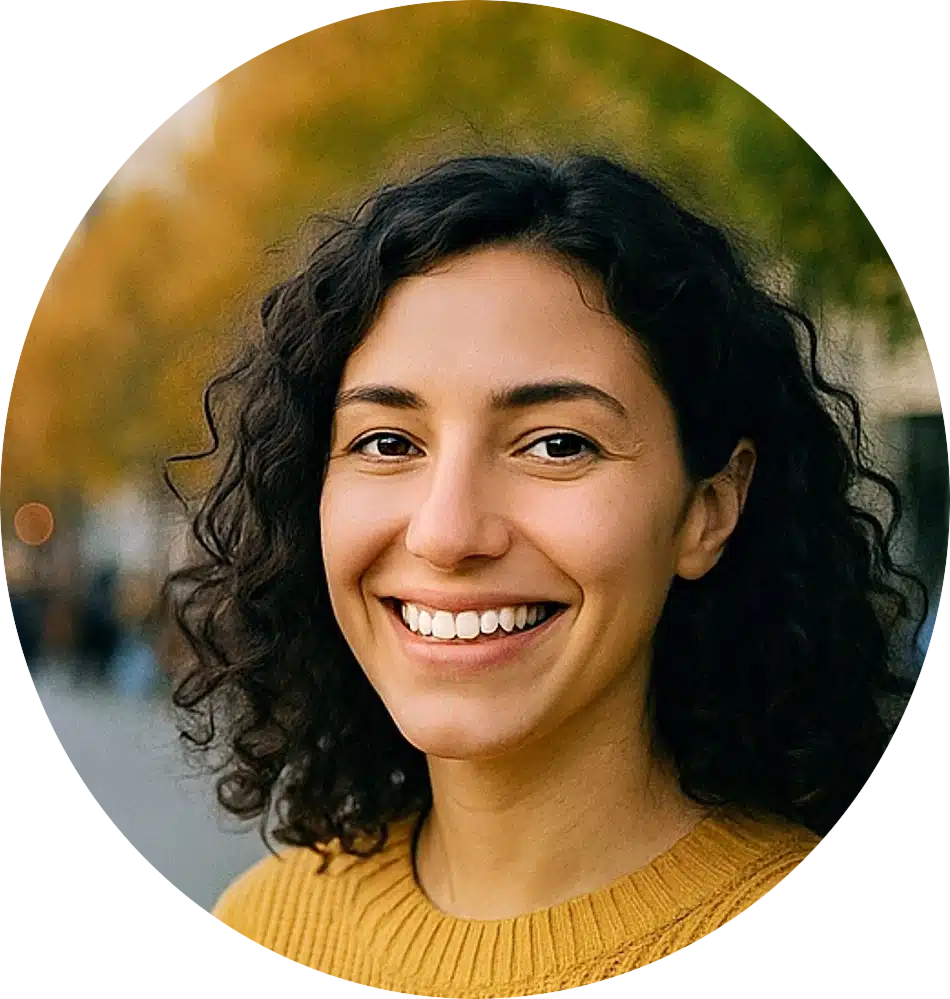
crop_faces=mode:fill,buffer:200 finds the face first and frames a headshot around it, wherever it happens to be. A headshot cropper that runs per request rather than per upload.
[ { "id": 1, "x": 1190, "y": 368, "width": 198, "height": 274 } ]
# the face spans x=1190 to x=1388 on a 1536px image.
# a center square covers x=256 to x=1280, so it keeps
# 90 of her 198 pixels of face and cuts the rest off.
How the profile picture pipeline crops, enhances, and strips metadata
Five operations, one request, run on every avatar upload. Each one is there because something specific breaks without it.
What breaks without each step
- crop_faces without it, you crop the middle and cut off their head
- enhance without it, an underexposed phone photo stays underexposed at 48 pixels
- no_metadata without it, you serve the GPS coordinates of their house to everyone
- rounded_corners without it, the UI applies a CSS mask that breaks in email and exports
- output=webp without it, you ship a 2 MB PNG as a 48 pixel avatar
The whole thing, one request
crop_faces=mode:fill,width:400,
height:400,buffer:200/
enhance/
no_metadata/
rounded_corners=radius:max/
output=format:webp/
WV4Bqu8HQOWXxtTUHkwV
No worker, no queue, no bucket per step. Cached at the edge like any other asset. That URL is the whole avatar API, so there is no separate avatar service to run and no profile picture API to keep in step with your user table.
Multiple avatar sizes from one uploaded photo
Each of these is a URL against the same handle, computed once and cached at the edge. When the header avatar goes from 32 to 40 pixels you change a number, rather than running a migration over every user’s photo.
That is the practical difference between a resize matrix you maintain and a transformation you request. It is also why an image resize API and a thumbnail API are the same endpoint here, with a different number in the path.
 48px
48px
 96px
96px
 200px
200px
 400px
400px
Default avatars and safety checks for profile pictures
The default avatar, at the CDN
Most applications handle the missing avatar with a null check in every template that renders a user, and miss one. The fallback operation names a handle to serve when the file is missing or errors, with its own cache setting, so the CDN answers with a real image.
fallback=handle:DEFAULT_AVATAR,cache:3600/
rounded_corners=radius:max/
USER_AVATAR_FILE
Safe, and stripped of location
An avatar is the one image a user publishes to everybody, so it is worth two more segments. sfw scores it before it goes public, and a Workflow holds anything below your threshold instead of publishing it and waiting for a report.
no_metadata strips the EXIF, which on a phone photo means the GPS coordinates of wherever it was taken. Most avatar flows ship those without noticing.
Building an avatar pipeline yourself versus one URL
Build it yourself
Or write one URL
crop_faces=mode:fill,width:400,buffer:200/
enhance/no_metadata/rounded_corners=radius:max/
output=format:webp/WV4Bqu8HQOWXxtTUHkwV
This is not an avatar generator API. Nothing synthetic is produced and the face in the result is the face they uploaded. Detection has limits too, and heavy occlusion or an extreme angle will miss, which is what smart_crop, the content aware crop, and fallback are for.
Frequently asked questions about profile picture processing
How do I crop a profile picture to the face automatically?
Use the crop_faces operation with mode:fill and a target width and height. It detects the face in the profile picture upload and frames the crop around it, with a buffer parameter setting the room left around the face. That call is the core of a profile image API assembled from chained URL operations.
What is the right profile picture size?
Render whatever sizes your interface uses from one source rather than committing to a single profile picture size. A chained URL produces a 48, 96, 200, or 400 pixel avatar on demand and the CDN caches each one, so changing your design does not mean reprocessing every user’s photo.
How do I serve a default avatar?
The fallback operation names a handle to serve when the requested file is missing or errors, with its own cache setting. That puts the default avatar at the CDN rather than in a null check in every template that renders a user.
Can I check an avatar for inappropriate content?
Yes. The sfw task scores the image before it becomes the user’s public face, and a Workflow can hold or reject the upload based on the score rather than publishing it and waiting for a report.
Does it strip location data from uploaded photos?
The no_metadata operation removes EXIF, IPTC, XMP, and color profile data, which includes the GPS coordinates most phones write into a photo. Include it in the chain and the avatar you serve carries none of it.