





A file processing workflow shown as a diagram and JSON
Detect faces on upload, blur them only when one is found, compress, then store. Create a workflow →
- 01Detect facesIntelligence task
- 02Blur facesConditional transform
- 03CompressOutput transform
- 04StoreFinal destination
"name": "ugc-face-privacy-pipeline",
"next": [{
"name": "detect_faces",
"task": { "params": { "export": true } },
"next": [{
"name": "blur_faces",
"requirements": [{ "type": "and",
"conditions": [{
"task": "detect_faces",
"path": ["faces", "length"],
"condition": "gt",
"value": 0
}] }],
"next": [{ "name": "compress",
"next": [{ "name": "store" }] }]
}]
}]
}
The visual builder and API tree describe the same four-task workflow.
Conditional routing between workflow tasks
Each task reads the result of the one before it and decides whether to run.


Trigger on upload, run async, notify on completion
A workflow attaches to the upload policy, so it fires the moment a file arrives. Heavy jobs (transcodes, video moderation) run asynchronously. When the run resolves, the fs.workflow webhook closes the loop with per-task results. The queue and the poller are ours.
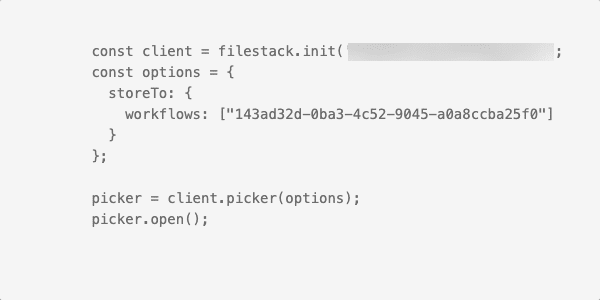
One key in storeTo connects the upload to the workflow.
Workflow tasks for scanning, intelligence, conversion, and transcoding
Group them by category and route between them conditionally. One declaration covers an image processing pipeline, a document processing workflow, or a media processing pipeline, and only the task list changes.
Transcoding
Transcode audio and video to delivery formats, which is the step a video processing pipeline is usually built around.


The destination is a set of parameters, not another pipeline.
Store workflow output in your own cloud storage bucket
A pipeline ends with store, and that task takes its destination as parameters. Point it at S3, Azure, Google Cloud Storage, Dropbox, Rackspace, or Cloudinary, pick one of 23 AWS regions, then set container, path, and public or private access.
Leave it empty and the output stays in Filestack storage. Moving a pipeline between backends changes those parameters and nothing else.
Workflow use cases for images, documents, video, and print
Each is a task chain you can declare once and run on every upload.
Scan, moderate, transform, publish
# fail any gate → quarantine
Detect, OCR, convert, notify
→ webhook to CRM
Transcode, thumbnail, notify
→ thumbnail → notify
Validate DPI, convert to print-ready
# reject the file that would fail at the press
Build vs buy a file processing pipeline
A DIY pipeline requires a queue, worker pool, retry logic, state tracking, monitoring, and on-call ownership. A Filestack Workflow replaces much of that infrastructure with a declaration you attach to uploads.
- Queue + workers
- Retries + state
- Monitoring + on-call
- Declare the workflow
- Attach to upload
- Read the webhook
Frequently asked questions about Filestack Workflows
What is a Filestack Workflow?
A Filestack Workflow is a declared pipeline of processing tasks (virus scanning, content moderation, transformation, transcoding, OCR) that runs automatically on upload and reports its results through webhooks. It is a workflow automation API for files, declared once rather than wired together per job.
Can workflows run conditionally?
Yes. Workflows support conditional routing, so a file can take different paths based on the result of an earlier task: for example, only continuing to publish if a virus scan is clean and a moderation check is safe.
How do I get workflow results?
When a workflow run resolves, Filestack sends an fs.workflow webhook to your endpoint containing the per-task results, so your backend is notified without polling.
Do workflows work with any storage backend?
Workflows operate on files in the Filestack pipeline and can deliver results to your configured storage, including S3, Azure, Google Cloud Storage, and Rackspace.