



Domain Whitelists for Upload
Domain whitelisting is a method that blocks requests which don’t contain an approved domain in their header. It’s one way of securing your application and resources, so others don’t attempt to piggyback on your account.
Domain Whitelists for Delivery
Delivery domain whitelists enable developers to provide a list of domains from which their files can be downloaded. This can avoid domains that either steal API keys or use someone else’s files on their websites.

How Filestack’s Domain Whitelist Feature Works
1 To start, add any domains that you’re using to the domain whitelist manually. If there are multiple domains that need to be verified, they can be added easily using regular expressions. For example, if you want to allow any subdomains on “domain.com” to be added to the domain whitelist, you simply add “*.domain.com” into the list.
2 The added domains will then be sent through the “Origin” header to the File Picker.
3 Domain whitelisting tells Filestack which domains it should expect to be placing requests for. If a domain sends a request that isn’t one of the approved domains, then the File Picker will not work.
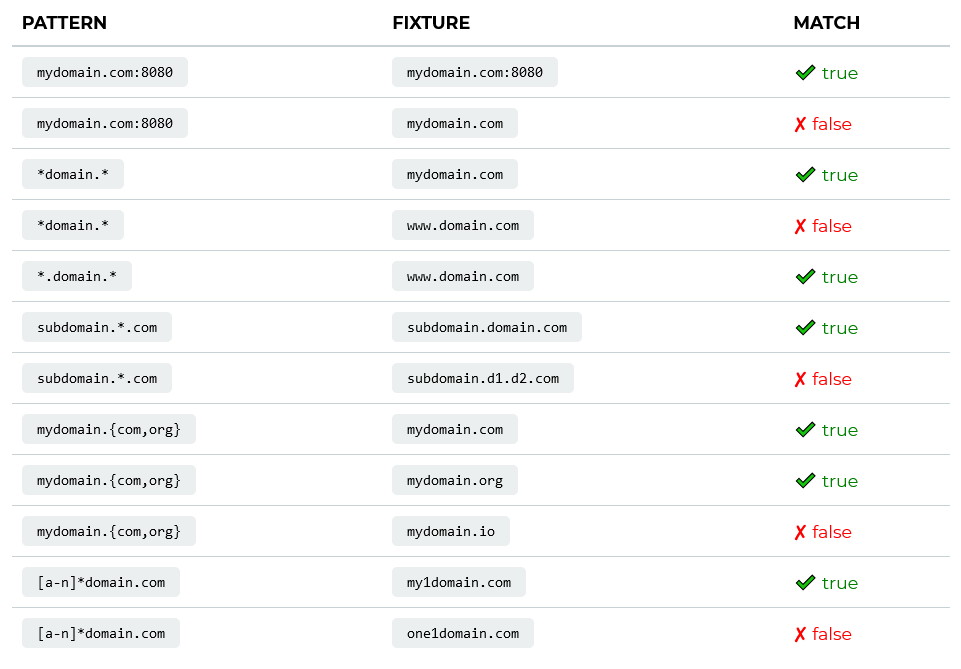
Domain Whitelists Examples
How You Can Secure Your API Keys With A Domain Whitelist
If your API key is included in the front end of your application, it can be viewed by users—but if you use domain whitelisting, having your API key exposed becomes a nonissue. Nevertheless, API keys can’t be removed entirely. API keys are necessary in order to identify and authenticate the users of your application. Filestack assists in creating layers of security for your application to make sure that your API keys have the necessary protection and can only be used by your organization. To learn more about how Filestack can help secure you and your users, read further about security policies.


WAY MORE THAN A FILE UPLOADER WIDGET: A COMPLETE SECURE UPLOAD SYSTEM.
What Filestack Can Do For You

SECURE CLOUD STORAGE
Upload files to Amazon S3, Microsoft Azure, Google Dropbox, Rackspace, or Google Cloud Storage. SSL encryption is also implemented to protect data and control access on your cloud storage of choice.

SECURE API
All requests will need to be signed with the secret key and Hash Message Authentication Code.
SECURE CDN
Deliver large multimedia files and documents to users with our powerful CDN, equipped with built-in optimization and security features.
Let’s Get Started.
Talk to us about how simple it can be to instantly and automatically transform any file or image.
Integrate in Just Seconds!
No matter what language you code in, you can easily implement Filestack onto your application. We are easily implemented in any language.
import * as filestack from 'filestack-js';
const client = filestack.init('YOUR API KEY');
client.upload(fileObject).then(data =>console.log(data.url));
gem 'filestack'
client = FilestackClient.new('YOUR_API_KEY', security: security_object)
filelink = client.upload(filepath: '/path/to/file')$ composer require --prefer-dist filestack/filestack-php
use Filestack\FilestackClient;
$client = new FilestackClient('YOUR_API_KEY');
$filelink = $client-upload('/path/to/file');$ pip install filestack-python
from filestack import Client client = Client("")
params = {'mimetype': 'image/png'}
new_filelink = client.upload(filepath="path/to/file", params=params)
print(new_filelink.url)